Snore Detector — On-Device Overnight Snoring Detection for iOS
 birds0416 / SnoreDetector
Project Overview
The project started as a free alternative to subscription apps like SnoreLab, inspired by Tareq Khan's paper "A Deep Learning Model for Snoring Detection and Vibration Notification Using a Smart Wearable Gadget" — a CNN trained on MFCC features of 1-second audio clips reaching 96% accuracy on a 1,000-sample dataset.
It grew from a solo snore recorder into a snoring × sleep-stage analyzer with an Apple Watch remote, and along the way ran into an iOS 18 platform restriction that broke the entire premise of the app — detection while the screen is locked. Fixing that is the most interesting engineering story here, and it is what pulled the custom Create ML model forward from "optional upgrade path" to "required".
App Screenshots
Tech Stack
| Area | Tooling |
|---|---|
| Platform | iOS 17+ (iPhone) and watchOS, Swift + SwiftUI |
| Audio capture | AVAudioEngine input tap, AVAudioSession in .record with the audio + processing background modes |
| ML inference | Custom Create ML sound classifier, run through SNAudioStreamAnalyzer forced to CPU-only compute units |
| Persistence | SwiftData (SleepSession → SnoreEvent), audio clips as AAC .m4a in the app's Documents folder |
| Health data | HealthKit, read-only sleepAnalysis category samples |
| Watch link | WCSession (WatchConnectivity) — Start/Stop remote only |
| Charts | Swift Charts |
| Cost | $0 infrastructure; no dependencies, no network calls |
Model Decision
Before writing any app code, three approaches to the detection model were compared on accuracy, effort, real-time on-device feasibility, and cost.
| Option | Accuracy | Effort | Real-time on device | Cost |
|---|---|---|---|---|
| 1. Train own CNN (the paper's approach) | 96% on the paper's dataset; a Create ML route on the same data lands in a similar ballpark | Medium — but low via Create ML on the free dataset, since no data collection is needed | Yes (Core ML) | $0 |
| 2. Apple's built-in SoundAnalysis classifier ⭐ | Good — trained on a massive corpus, robust in the real world, exact figure unpublished | Minimal — no training at all | Yes — designed for exactly this | $0 |
| 3. Paid model or dataset under $10 | No clear candidate better than the free options | — | — | Rejected |
Decision: start with Option 2, keep Option 1 as the upgrade path.
Apple's SNClassifySoundRequest built-in classifier recognizes 300+ sound
classes including snoring (plus breathing,
cough, speech, and silence, useful for
filtering), runs fully on-device in real time, and needs zero training.
The reasoning: the surrounding pipeline is identical regardless of which model sits inside it. Starting with the built-in classifier meant the entire core function — audio session, stream analyzer, event segmentation, clip saving, timeline — could be built and tested immediately, then A/B'd against a custom model later using real overnight recordings as test data. A decision based on evidence rather than guesses.
YAMNet also has a snoring class, but a TensorFlow → Core ML conversion is extra effort for no advantage over Apple's built-in model, so it was rejected.
Core Detection Pipeline
-
Audio capture. An
AVAudioSessionin.recordplus theaudiobackground mode keeps the microphone running with the screen locked all night. AnAVAudioEngineinput-node tap delivers live PCM buffers, which are deep-copied before asynchronous use because the system reuses the tap's buffer. -
Real-time classification. Buffers feed an
SNAudioStreamAnalyzerwith 50% window overlap. A window counts as a snore hit when thesnoringlabel's confidence clears the threshold (0.6 by default). - Event segmentation by hysteresis. An episode starts after 2 consecutive positive windows, which rejects one-off false positives, and ends after 10 seconds without a positive window, which merges individual snores (typically 3–6 seconds apart) into one natural snoring episode rather than hundreds of fragments.
-
Clip saving with pre-roll. A rolling in-memory ring buffer holds the
last 10 seconds of audio. When an episode starts, the buffer is flushed into a fresh
AAC
.m4afile and live audio streams in until the episode ends — so the first snore that triggered detection is actually in the recording. Event start times are backdated to cover the trigger windows. Non-snoring audio is never written to disk, for both privacy and storage reasons. -
Persistence and review. Each episode becomes a SwiftData
SnoreEvent(start, end, peak confidence, clip filename) belonging to aSleepSession. Deleting a session cascades to its events and removes its clip folder from disk.
Phone calls and Siri are handled explicitly: the engine observes
AVAudioSession.interruptionNotification and automatically restarts the
engine when the interruption ends with the .shouldResume option — otherwise
a 2 a.m. phone call would silently end the night's recording.
Tuning knobs
| Parameter | Default | Effect |
|---|---|---|
confidenceThreshold |
0.6 | Raise if false positives, lower if snores are missed |
endHangover |
10 s | How much silence ends an episode |
consecutiveToStart |
2 windows | Debounce before an episode starts |
preRollDuration |
10 s | Audio kept in memory before the detection trigger |
The Locked-Screen Bug — and Why the Custom Model Became Mandatory
The root cause turned out to be a known iOS 18 platform restriction rather than a bug in
the app. Apple's built-in SoundAnalysis classifier runs on the GPU, and iOS
forbids GPU work from backgrounded or locked apps. Every single classification
window was failing silently with
kIOGPUCommandBufferCallbackErrorBackgroundExecutionNotPermitted. It worked
on iOS 15–17 and has been broken since iOS 18.
This promoted the "optional upgrade path" — a custom Create ML model — into a hard requirement, because CPU inference is permitted in the background. The fix, in two rounds:
Round 1 — a custom CPU-only model
Kaggle was blocked, but the paper's own dataset (16 kHz version) is mirrored in the
adrianagaler/Snoring-Detection GitHub repo, so 500 snoring and 500
non-snoring 1-second clips were pulled via sparse checkout. A Create ML Sound
Classification model (Audio Feature Print, 0.975 s windows, 50% overlap) converged at
14 iterations with 100% training and 100% validation accuracy, exporting
to a 4.8 KB .mlmodel.
The engine now loads it with MLModelConfiguration.computeUnits = .cpuOnly
and passes it to SNClassifySoundRequest(mlModel:), falling back to the
built-in classifier (foreground-only, with a warning in the debug log) if the model
isn't bundled. Retest: still failed when locked. The Create ML export
is a two-stage pipeline — Audio Feature Print feeding a classifier — and stage 0 was
still being denied compute in the background.
Round 2 — the missing background mode
The fix, confirmed by the Apple developer forums, was to add
processing to UIBackgroundModes alongside
audio. One developer reported a 14-hour locked-screen run on iOS
18.2 after this change. Applied, rebuilt, deployed — and locked-screen detection worked.
The unexpected upside: the app is no longer dependent on Apple's generic 300-class model. The detector is now purpose-trained on the reference paper's own snoring dataset, in a 4.8 KB model, and it happens to be the only configuration that works in the background at all.
Feature Tour
Four tabs on the phone, plus a Watch companion.
Record tab
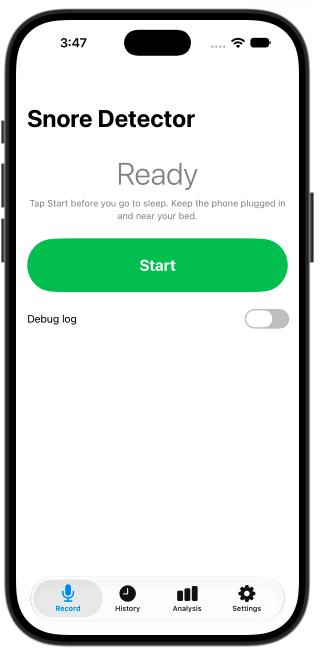
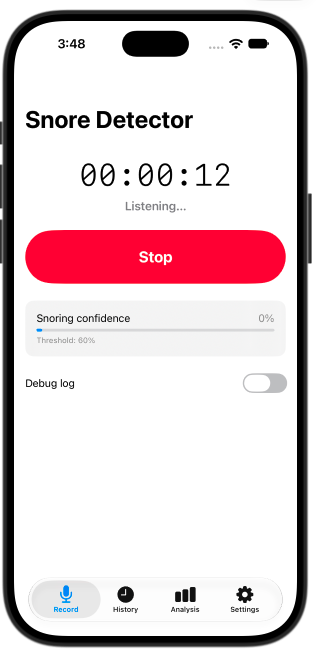
One large Start/Stop button, an elapsed session clock, a live snoring-confidence meter with the current threshold shown beneath it, tonight's episode list as it accumulates, an Apple Watch connection indicator, and a toggleable debug log that was invaluable for diagnosing the locked-screen failure.
History tab
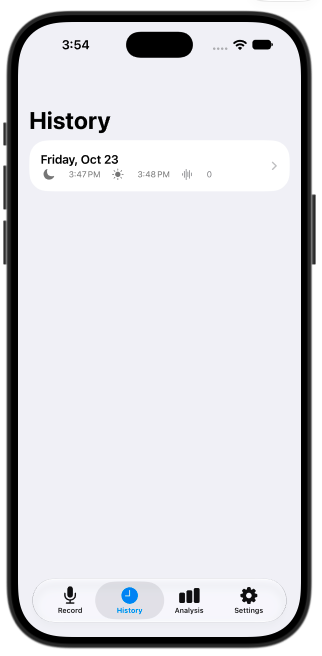
A list of past nights, each showing bedtime, wake time, and episode count. Opening a night gives three summary statistics (time in bed, total snoring time, and snoring as a percentage of the night), a horizontal night timeline strip with orange bars marking each snoring interval in its true position, and the full episode log with playback.
Each episode row carries a waveform scrubber: the clip's real amplitude envelope rendered as 96 peak bins, voice-memo style, with a draggable playhead. Spikes in the waveform indicate loud moments, so you can drag straight to the snore instead of listening through the clip. Dragging works even before pressing play — scrubbing loads the clip paused. Waveforms are decoded off the main thread the first time a row appears and cached in memory, with placeholder bars while loading, so the list stays responsive.
Analysis tab — snoring × sleep stages
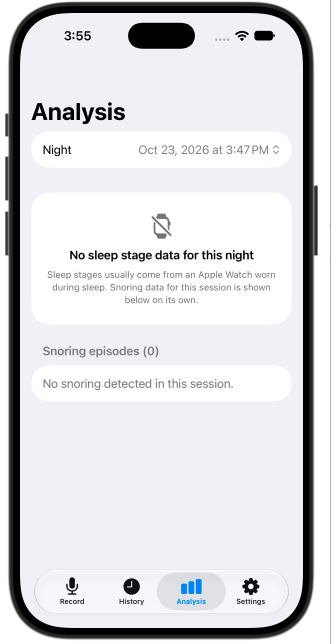
The core deliverable of the second phase. Pick a night, and the app overlays that night's snoring intervals onto the Apple Health sleep-stage timeline.
- Combined timeline — four sleep-stage lanes in Apple Health's own colour palette, with translucent orange snore stripes overlaid across all lanes by timestamp. Tapping a stripe highlights it and jumps to that episode.
- Per-stage statistics — snoring minutes, percentage of that stage spent snoring, and average peak confidence as an intensity proxy, for Awake vs REM vs Core vs Deep.
- Swift Charts bar chart — snoring minutes per sleep stage, colour-matched to the timeline lanes.
- Episode list with playback — each episode tagged with the stage it mostly occurred in, using the same waveform scrubber built for History.
Two details that mattered more than expected. First, snore episodes that span a stage boundary are split proportionally across the stages they overlap, rather than being assigned wholesale to whichever stage they started in. Second, sessions are matched to nights by actual sample time-range overlap rather than calendar day, so a session that crosses midnight pairs with the right night automatically.
Settings tab
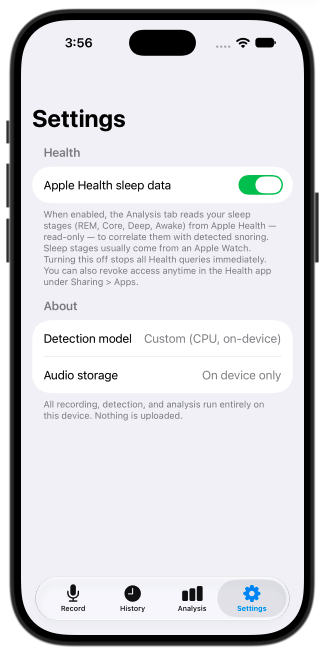
A single reversible toggle gates the Apple Health integration. Turning it off stops all Health queries immediately and clears the cache, and the footer explains that access can also be revoked from the Health app itself. The About section states plainly that the detection model is custom, CPU, and on-device, and that audio storage is on-device only.
A subtlety worth noting: iOS never tells an app whether Health read permission was denied — for privacy reasons, "denied" and "no data" look identical. The empty-state copy is written to account for that, pointing at the most likely cause (no Apple Watch worn during sleep) rather than asserting a permission problem.
Apple Watch companion
A deliberately minimal remote: one big Start/Stop button, the elapsed timer mirrored from the phone, and an iPhone-connection indicator dot. The Watch never records audio — the iPhone stays the recorder.
Making this work cleanly required refactoring start/stop out of the view and into a
shared RecordingCoordinator, so that the phone UI and the Watch drive the
identical code path for session creation, event persistence, and engine
lifecycle. That matters because the Watch has to be able to start a session
headlessly, when the app was woken in the background rather than opened
by the user.
The delivery model has two paths: when the Watch is reachable,
sendMessage delivers commands instantly; when the phone app is backgrounded
or not running, transferUserInfo queues the command and the system wakes
the app to deliver it — which works precisely because of the audio and
processing background modes added for the locked-screen fix. State is also
pushed via updateApplicationContext so the Watch shows the correct state
even if its app is opened much later.
Milestones
| Milestone | Scope | Status |
|---|---|---|
| M1 | App skeleton — microphone permission, background audio session, live classifier with confidence meter and debug log | Complete |
| M2 | Event segmentation and timestamped clip saving with pre-roll | Complete |
| M3 | SwiftData session store, timeline review screen with playback | Complete |
| M4 | Real overnight testing and threshold tuning — 3 sessions on a physical iPhone | Complete |
| M5 | Custom Create ML model (forced by the locked-screen bug) + read-only HealthKit integration with a reversible Settings toggle | Complete |
| M6 | Analysis tab — snoring × sleep-stage correlation (core deliverable) | Complete |
| M7 | watchOS companion — Start/Stop remote via WatchConnectivity | Code complete; Watch target signing and on-device pairing test pending |
| — | UI polish, then optional free App Store publication | Planned |
Engineering Notes
Problems that took real diagnosis, beyond the locked-screen story above.
- Behavioural details of the buffer tap. The audio tap's buffer is reused by the system, so it must be deep-copied before being handed to an asynchronous analysis queue — otherwise the classifier reads whatever the next callback overwrote.
-
@ObservableandNSObjectdon't mix cleanly. BothSNResultsObservingandAVAudioPlayerDelegaterequireNSObjectProtocol. Rather than fight the macro, the classifier observer and the player delegate are each a separate smallNSObjectproxy, retained explicitly because the analyzer andAVAudioPlayerboth hold their delegates weakly. -
Simulator dead ends. An early "Simulator device failed to launch — no
such process" turned out to be a wedged simulator device rather than a code problem
(fixed by erasing all content and settings). It did prompt a defensive guard: if the
input format reports 0 Hz — no audio input available — the app now shows a clear
explanatory error instead of crashing with
SIGABRT. -
Playback must not steal the microphone.
ClipPlayerrefuses to load a clip while a recording session is active, because switching the audio session category to.playbackmid-session would end the night's recording. -
Sleep-stage source de-duplication. If real Apple Watch stage data exists
for a night, unstaged
asleepUnspecifiedsamples (iPhone-only estimates) are ignored so the two sources don't double-count. If there's no Watch data at all, unstaged sleep is shown as Core so the night is still visible. - Stage resolution is cached in memory, not persisted. Keeping it out of SwiftData avoids a schema migration and stays correct if the underlying Health data changes later.
Privacy & Practical Considerations
- No network access at all. Recording, inference, and analysis all run on the device; nothing is uploaded, and there is no server to upload to.
- Only snoring is ever persisted. Non-snoring audio lives in an in-memory ring buffer and is overwritten, never written to disk. Deleting a session in History deletes its clips.
- Health access is read-only and reversible — sleep stages only, gated behind an in-app toggle, revocable from the Health app.
- Battery. On charge, negligible; unplugged, roughly 5–15% per hour, so charging overnight is recommended. Only the microphone and CPU inference are active with the screen locked, disk writes happen only during snore events, AAC encoding is hardware-accelerated, and there is no networking.
- Storage. A heavy-snoring night comes to tens of megabytes of clips, not gigabytes.
Code & Repository
Native SwiftUI, iOS 17+, no third-party dependencies. Around 2,400 lines of Swift across the iOS and watchOS targets. The repository README covers building, signing with a free Apple ID, testing detection before a real night, and the tuning knobs.
Reference
- T. Khan, "A Deep Learning Model for Snoring Detection and Vibration Notification Using a Smart Wearable Gadget," Electronics, vol. 8, no. 9, 2019. doi:10.3390/electronics8090987 — a CNN on MFCC features of 1-second clips, 1,000 samples, 96% accuracy. Its dataset is the one this app's classifier is trained on.