Golf Clicker 1.1 — Apple Watch Experience
Why This Update
On the course, the watch is where Golf Clicker is used most, and it shares the wrist with other golf
apps. 1.1 focused entirely on the Apple Watch: getting back to the counter faster, fitting every case
size, and making sync more trustworthy. Stroke counting itself did not change, and the update stayed
completely free.
2
New watch widgets: complication and Smart Stack card
40–49 mm
Watch sizes checked: 40, 42, 46 and 49 mm
34
Unit tests (20 → 34)
4
Targets: iPhone, Watch, Live Activity extension, new watch widget extension
What Changed and Why
- NewWatch-face complication. Circular, corner and inline styles. Shows a golfer symbol when idle and "H7 · 3" while counting; tapping it opens the live counter. Why: golfers switch to 18Birdies for distances every hole; one tap on the watch face brings them back.
- NewSmart Stack widget. Hole and par, the stroke count, and "Thru 6 · +2". While a round is active it tells watchOS it is relevant for six hours after the last change, so it ranks near the top of the stack. Why: a second fast way back that needs no complication slot.
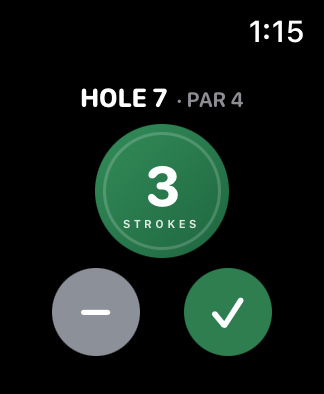
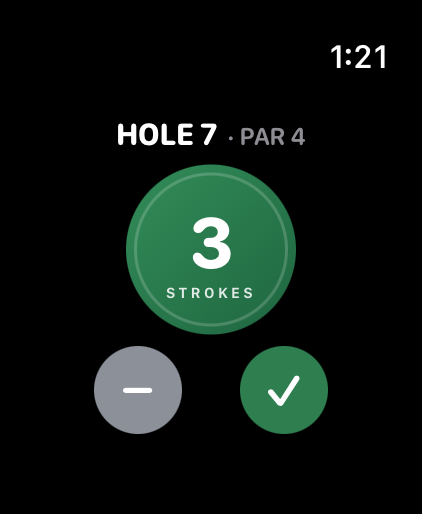
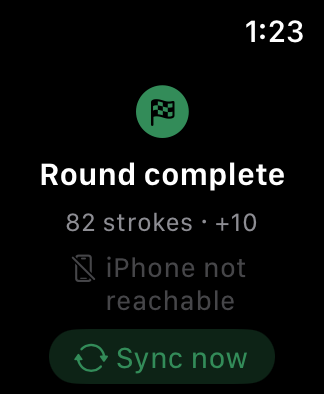
- FixLayout for every case size. The counter now budgets height for the title and the 44 pt Undo / Finish buttons first, and the stroke button takes what is left. Status screens scroll instead of clipping. Why: on 41 mm watches the 1.0 controls fell below the screen edge.
- FixSync decides conflicts by revision, not by clocks. Each watch event carries the snapshot revision it was based on, so the phone can reject a tap made without seeing a newer phone edit. The phone answers each message with the fresh snapshot in its reply, delivering and acknowledging in one round trip. Why: comparing two devices' clocks is unreliable, and an extra round trip on every wrist raise was wasted work.
- FixLess work on wrist raise. The watch re-reads stored state and only asks the phone if nothing arrives within 1.5 s. Widgets reload only when a displayed value changes, and animations are skipped while the wrist is down. Why: battery. These reductions were made by inspection; battery use was not measured for this release.
- NewWatch app icon from the original artwork. The green ball-and-flag disc was extended to fill the watch's circular mask without a dark ring.
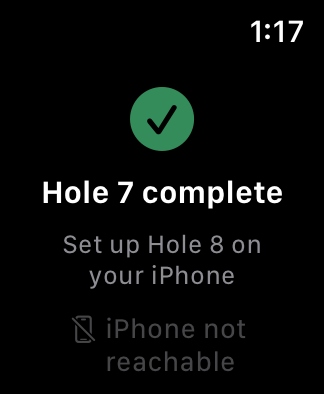
Screenshots (1.1, simulator)
Engineering Notes
- A new watchOS WidgetKit extension shares round state with the watch app through an App Group. One mapping turns the iPhone snapshot plus local taps into display state, and the watch screen, complication and Smart Stack all use it, so they cannot disagree.
- Widget timelines are single-entry and never refresh on their own. The app reloads them only when what they show changes, at most once per second of tapping.
- watchOS does not let an app keep itself in front of another app. For long rounds, Settings ▸ General ▸ Return to Clock ▸ Golf Clicker ▸ "After 1 hour" makes a wrist raise return to Golf Clicker.
Known Limitations in 1.1
- LimitThe watch still waited for par. After finishing a hole, the watch showed "Set up Hole 8 on your iPhone" until par was picked on the phone. Removed in 1.2, where par became optional.
- LimitRounds still had to reach hole 18, and holes could not be skipped. Addressed in 1.2 from golfer feedback.
- LimitVerification gaps. Complication and Smart Stack rendering were verified in the simulator and by unit tests; battery impact was not measured.